Finding Sources
Finding Sources
Locating Sources: Using the Kimbel Library
LET'S GET STARTED
Knowing where to search is just as important as knowing what words to search. When you're just looking for fast information like who won last night's game, searching Google will find what you need. When you need to find sources for a paper or research project, though, and especially if the assignment says to use library sources, or scholarly or peer-reviewed ones, Google might not have everything you want. There are a few different ways to find library resources. Depending on what type of material you are looking for, you may find yourself using different tools on our website, like the library catalog, databases, or OneSearch, or a blend of both.
GOT BOOKS?
If you need to find books, you may want to stick with searching the library catalog. To search only this part of the library collection, click on the Library Catalog tab above the search box on the library page. Searching here will find books owned by the library, including paper copies as well as ebooks that can be read right from a computer screen, no fancy equipment needed.

HOW ABOUT ARTICLES?
If you need to find articles, library databases are your best bet. Databases are searchable collections of background information on the articles or books they contain. They save you the time of flipping through hundreds of journals, newspapers and books looking for information on your topic. Think of databases as being like a file cabinet; each drawer is organized with certain files or information in it. Many databases also have the complete versions of the articles or books they contain, or a Find Full Text link that will help you connect with the complete text. Click the link to get to the entire article. This works the same in all of our databases.
ISN'T EVERYTHING I NEED IN MY FAVORITE DATABASE?
Probably not. Not all databases contain articles about all subjects. In fact, most do not. General databases such as Academic Search Complete may find plenty of information about your topic. When you research for all your classes, though, you may find better articles in other databases that only contain information about a specific field or major. Remember that file cabinet idea? A specific database such as EducationResearch Complete will only have articles about education and education-related topics. Newspaper Source Complete will only have newspaper articles, not scholarly journals. Databases will only search within their own files.
To find databases about specific topics, click on Databases A to Z (found above the search box on the library's homepage; see image below).
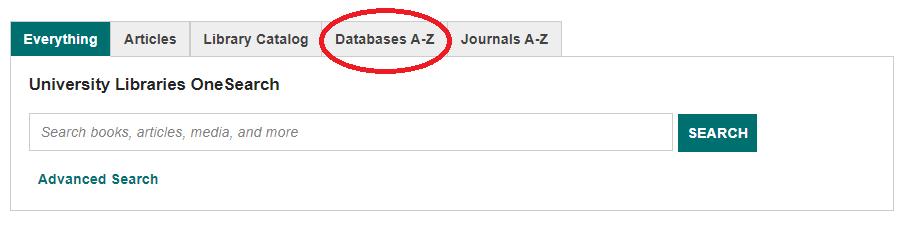
The new screen that appears after you click "Browse Databases by Subject" lists broad subject topics for databases. We have over 100 databases to choose from, so librarians organized them all by these subjects. Most of these line up with classes or majors such as Accounting, Business, Communication, Marine Science, Music, and Theatre Arts. Click a subject topic to see a list of suggested databases. Each database will have a short description about the topics covered inside. Select the best one (or more) that fits your topic, click the name of the database, and begin searching.
USING CCU'S ONESEARCH
It's possible that you may not know where to begin your research. Maybe you are still working with your topic and trying to decide what angle you want to take with it. Maybe your topic doesn't line up with a particular subject area, or you are interested in looking at a topic from a few different angles. It is also possible that you only need a few items—a book, or a couple articles from journals, magazines, or newspapers. Or maybe you have the title of an article and the authors but you don't know where to find the article. Each of these situations is ideal for using CCU's OneSearch.
OneSearch is not hard to find. In fact, it is the search box right on the library's homepage. From the OneSearch search box, you can find books and other materials from the library, as well as journal articles from most library databases. It's like searching an entire room—or library—full of file cabinets. OneSearch is a simple, fast, Google-like search of library sources. Search with keywords just like any other database the library owns.
Depending on your topic and the keywords you've selected, you may be overwhelmed with the number of results you get when searching in OneSearch. This is because OneSearch is searching a massive number of files for your keywords. You may also find results that are not on your topic.
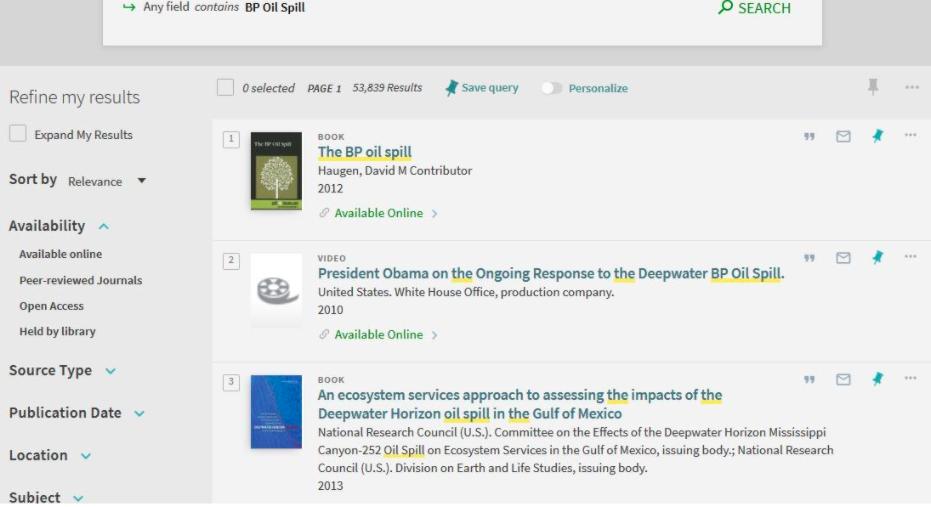
For example, searching for "bp oil spill" found over 53,000 results, some going back to the 1960s. The results include books, articles, and other types of results. If you find too many results, or your results are not what you had in mind, adjust your keywords or use the options in the menu on the left. The menu lets you limit results to items from peer reviewed journals or from the library catalog (mostly books, ebooks, and videos); you can also refine results by publication date and other options.
You may search in a specific database as well as search in OneSearch to see which tool works best for a particular research topic.
KEY POINTS TO REMEMBER
- Knowing where to search is just as important as knowing what words to search
- Knowing where to search starts with knowing if you need to look for a format, such as books, articles, or videos
- Decide what you need to find, then select one or more tools to use to search
- This may be Google, the library catalog, a database, or OneSearch.
- OneSearch searches through most of the library's content. It doesn't search everything, but it does find a majority of our items.
- OneSearch can be a good place to start researching if you are not sure where to begin looking
For citation, use:
Coastal Carolina University, Department of English, First-Year Writing Program. "Finding Sources." Coastal Composition Commons, 24 August 2017, https://ccc.coastal.edu/task/discover-4/. Accessed xx xxxxxx xxxx.